
Are you looking for inspiration on what to wear for the Dress To impress Apocalyptic Theme? I have three outfit suggestions you could try for the apocalyptic theme, or a theme like Dystopia etc, where you can create a grungy outfit. Keep on reading to see all three outfits…
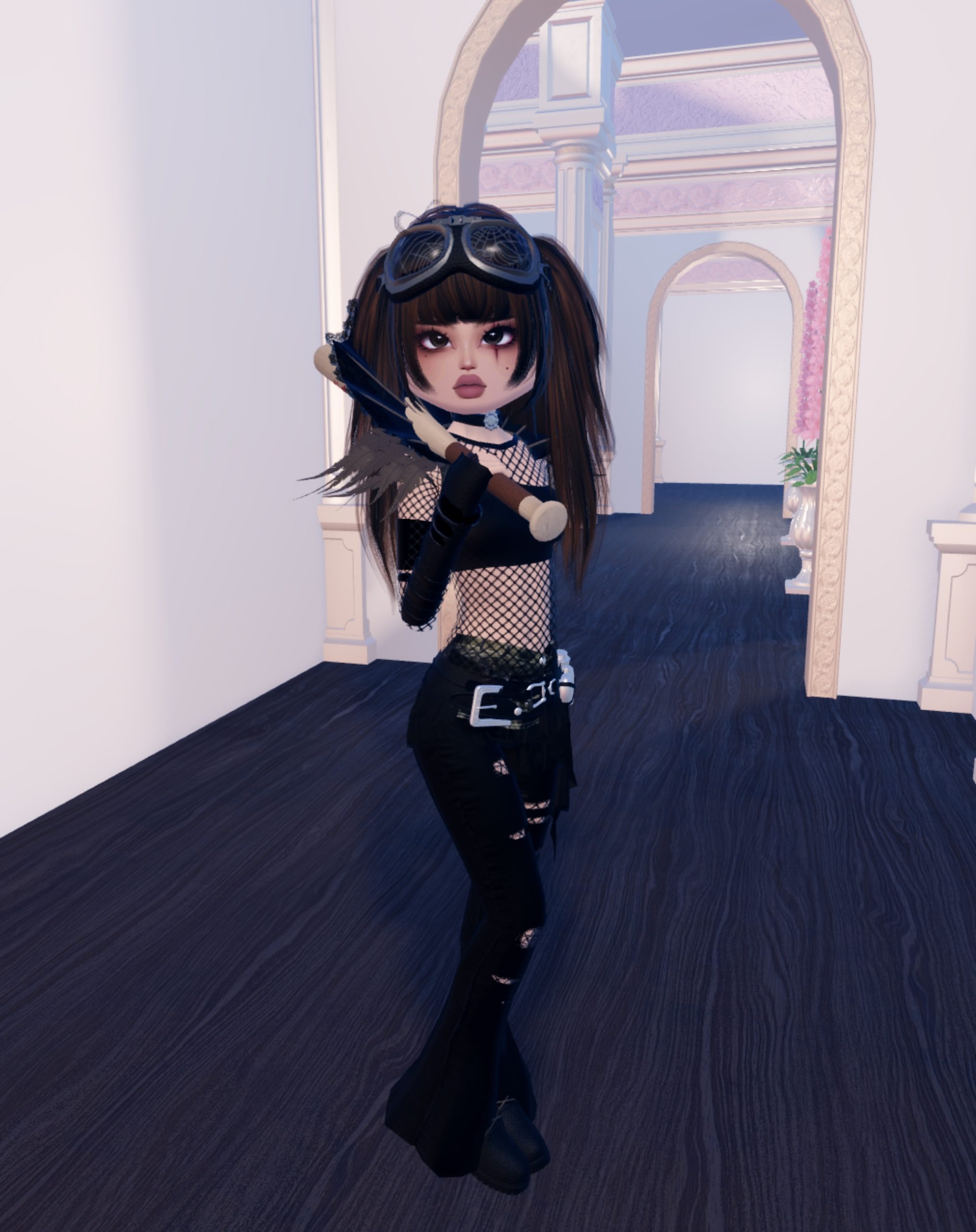
I started with the mesh shirt from the male section in non-VIP on toggle “1” and black #000000.
For my top, I used the one shoulder crop top in black #000000. On the arms, I used the buckled cuffs in black #000000, #000000 and silver for the buckles #c9cbce.
On the hands, I used the fingerless gloves from VIP in black and silk #000000, with the chunky bangles layered over the top in black #000000.
I used the bootcut jeans in the “default” toggle, flower removed, “torn rips” toggle, and black #000000. Underneath the jeans, I wore the fishnet stockings in thick and black, so they showed through the rips in the jeans.
I put on the flat boots from non-VIP in black for every section. For the waist, I put on the Brat skirt, and made every section black #000000. Then I layered the tool bet on the waist in black #000000, silver e9cbce, silver e9cbce and silver e9cbce. I also put on the buckled belt from non-VIP and made it black 000000 and silver e9cbce to match the colors of the tool bet.
For the neck, I chose the cape from VIP, but on the collar only toggle to remove the cape, and made it black 000000, black 000000, dark brown 5c4a3c and dark brown 5c4a3c. I also added the choker from the male mannequin on the Valentine’s display, and made it black 000000, silver e9cbce and e9cbce.
I added the goggles and made them black 000000, dark gray 5f5f5f and for the lenses, I added the spider web pattern, to give a smashed glass effect.
Lastly, I added the baseball bat in a pale wood color ebc09c, dark brown 6b4129 and red cd171 with the “paint” toggle switched on.
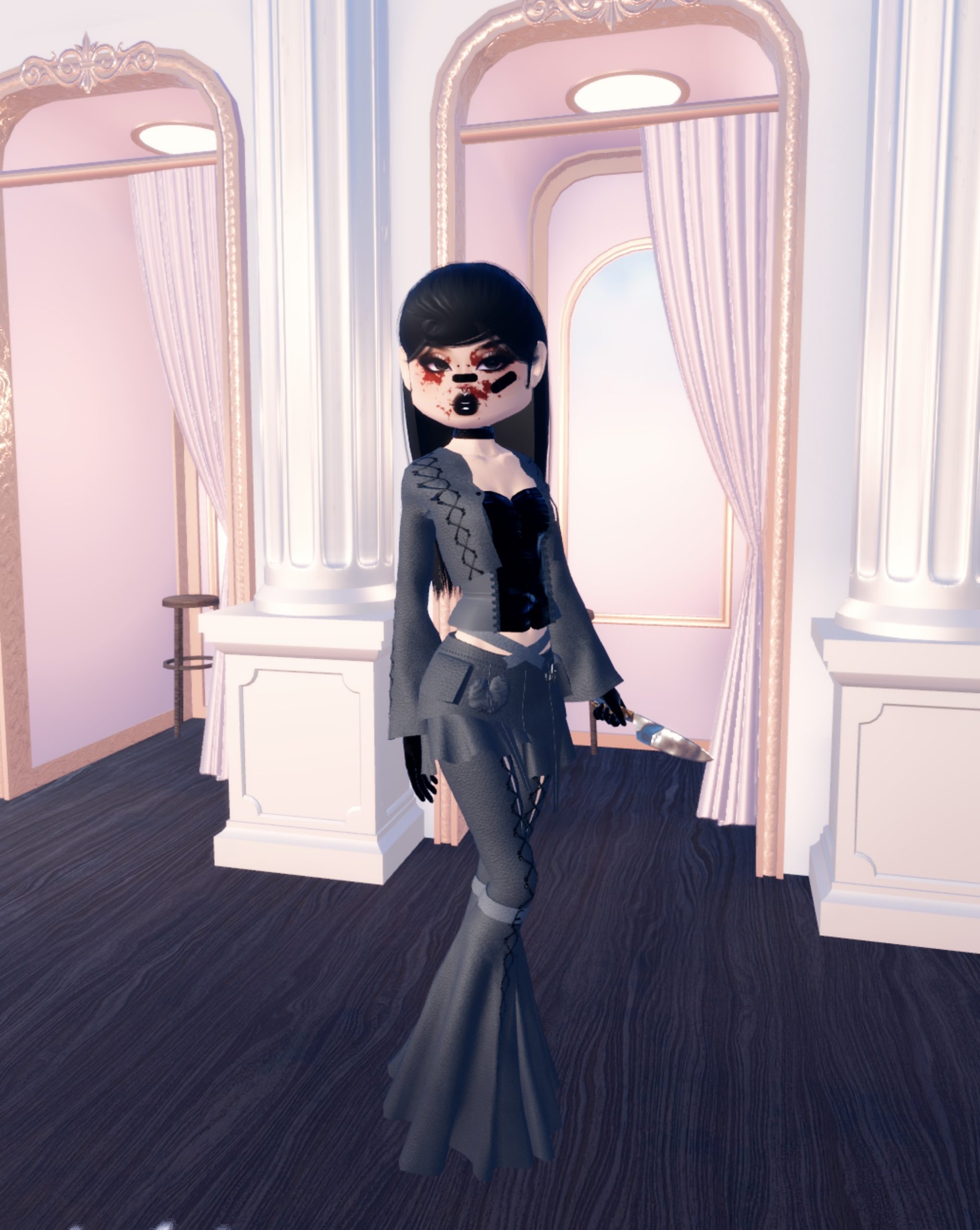
For my second apocalyptic outfit, I started with the corset from the 4BILLION set in dark gray 3f3f3f, black 000000 and dark gray 404040.
Over the corset, I added the cropped sleeves jacket from the VIP Valentine’s display, and removed the fur and removed the front lacing, making the colors dark gray 404040, black 000000 and black 000000.
To match the cropped jacket, I used the matching flared trousers from VIP on toggle “2” and the colors dark gray 404040, 606060, black 000000 and black 000000.
For shoes, I used the high heel pumps in black and silk, and the gloves from non-VIP on the “short” toggle removing the fur, and made them black 000000.
I put on the Choopie streetwear skirt made matte all over, and the same color 3f3f3f for all four sections.
I picked up the knife and made the handle brown 5c4a3c and the blade silver and foil material for a metal effect #7f7f7f. On the neck, I wore the chunky choker from non-VIP in black, and I added the Band-Aid with the toggles “right” and “nose” clicked, and made them black 000000.

For this theme, you could do a zombie, as they’re relatively easy to make, especially if you use the braided hairstyle in a pink color, to look like brains.
For the outfit, I started with the spiked choker necklace from the Valentine’s chest and chose colors 000000, 000000 and 69690c.
I put on the mesh top from the men’s’ section and chose toggle “3” and made it black 000000.
For the top, I started with the mermaid boob tube top and made it black 000000. On top of that, I used the Cupid’s Prodigy top on the “default” toggle, removing the jewels, veil and layer, and made it black 000000.
Next, I chose the flared pants from the Valentine’s chest, and chose toggle “1” and the following colors: 000000, 69690c, 69690c, 69690c.
For the shoes, I chose the knee-high boots from non-VIP and chose the “ankle length” toggle, and made them glitter and black 000000.
On the arms, I chose the Everlasting Love (currency) dress, but only the “sleeves” toggle, making all three sections 000000.
I added the Ice Queen Sleeves on the “2” toggle, and made them black 000000.
Lastly, I added the baseball bat, making both sections foil, to give a metallic effect, and chose the color bfbfbf for both sections.